Implicit CAST behavior
Changes in numeric and timestamp casting alter aggregates
Migration
Move Impala workloads (Hive-compatible SQL, Parquet/ORC tables, partitioned datasets, and UDF-dependent queries) to BigQuery with predictable conversion and verified parity. We prioritize data type mapping, semantic correctness, and validation and reconciliation so cutover decisions are backed by evidence—not assumptions.
Quick answer
Move Impala workloads (Hive-compatible SQL, Parquet/ORC tables, partitioned datasets, and UDF-dependent queries) to BigQuery with predictable conversion and verified parity. We prioritize data type mapping, semantic correctness, and validation and reconciliation so cutover decisions are backed by evidence—not assumptions.
Shared migration method
These canonical guides explain the repeatable method. The pair-specific sections below cover the platform constraints that change the migration decision.
Fit
Risk map
These are the common “gotchas” that cause silent result drift or cost surprises if not handled explicitly.
| Breakage | Mitigation |
|---|---|
| Type & CAST semantics driftDECIMAL precision/scale, TIMESTAMP nuances, and implicit casts can produce silent changes in results. | Mitigation: explicit data type mapping decisions plus automated cast normalization and parity tests. |
| Function differences and gapsString, date/time, regex, and conditional functions look similar but behave differently across engines. | Mitigation: function-by-function rewrites with flagged exceptions and “golden query” result checks. |
| Partition model mismatchmpala partitions (often directory-based) don’t map 1:1 to BigQuery partitioned tables. | Mitigation: partitioning design up front (ingestion-time vs query-time), plus clustering where it improves pruning. |
| NULL behavior edge casesNULL comparisons, anti-joins, and predicate pushdown assumptions can change outputs—especially in multi-join analytics. | Mitigation: rewrite patterns for NULL-safe logic and validate with targeted edge-case datasets. |
| UDF/UDAF portabilityJava-based Impala UDF/UDAFs do not “lift and shift” into BigQuery. | Mitigation: choose a UDF strategy (rewrite in SQL, use remote UDFs where appropriate, or precompute/reshape data). |
| DDL & storage assumptionsImpala external table definitions and location-based patterns do not carry over directly. | Mitigation: translate DDL intent (schema + constraints + partition strategy) and formalize ingestion into BigQuery-managed tables. |
| Window and analytic function nuancesDefault ordering, ties, and frame definitions can differ; this often shows up in ranking, sessionization, and incremental reporting queries. | Mitigation: enforce explicit frames/order clauses and validate using known “golden” report outputs. |
| Performance regressions from scan patternsQueries that were acceptable in Impala can become expensive in BigQuery if they scan too broadly or explode row counts. | Mitigation: bytes-scanned hygiene (selectivity, pruning), plus clustering/materialization patterns. |
| CTE and subquery rewritesComplex nested queries may need structural rewrites for BigQuery optimization and readability. | Mitigation: rewrite to stable patterns, validate outputs, then tune. |
Flow
Extract → Plan → Convert → Reconcile → Cutover to BigQuery, with exception handling, validation gates, and a rollback path
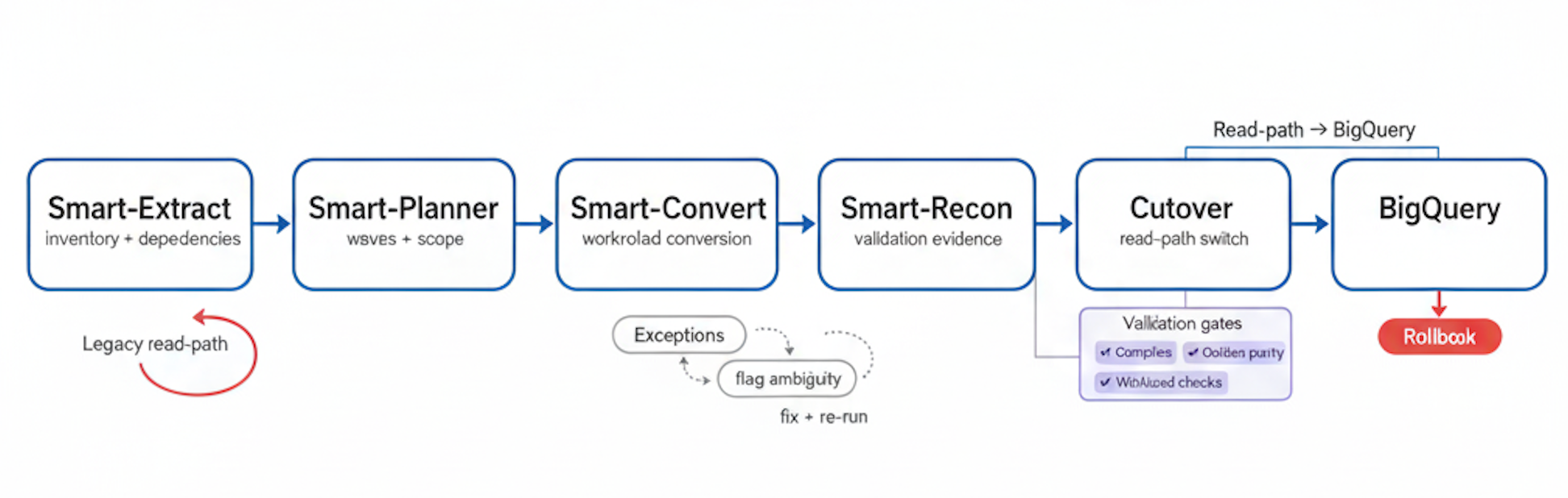
Conversion
Impala to BigQuery migration is not just “SQL translation.” The objective is to preserve business meaning while aligning to BigQuery’s execution model and cost structure. SmartMigrate converts what is deterministic, flags ambiguity, and structures the remaining work so engineering teams can resolve exceptions quickly. At a high level, we handle DDL conversion (schemas, types, partition intent), query conversion (joins, windows, CTEs, subqueries), and a pragmatic UDF strategy that accounts for what cannot be ported directly. Every conversion step is paired with validation signals: compiler checks first, then semantic checks, then reconciliation. What we automate vs. what we flag:
Execution
01 Inventory
Identify Impala tables, queries, dependencies, SLAs, and critical golden outputs that define correctness.
02 Cutover
Define data type mapping decisions, workload waves, risk areas, and the cutover plan structure.
03 Convert
Translate Impala SQL to BigQuery, classify exceptions, and produce a prioritized fix list.
04 Cutover
Choose batch and/or CDC patterns, define parallel run approach, and establish rollback criteria.
05 Validate
Run row counts, aggregates, sampling diffs, and golden query parity checks; document variances and resolutions.
06 Step
Tune partitioning/clustering, materialization, and query patterns; reduce bytes scanned and stabilize concurrency.
07 Cutover
Execute cutover with canary gates, monitor SLAs, and keep a tested rollback path available until stability is proven.
Failure modes
Changes in numeric and timestamp casting alter aggregates
Impala partition logic does not map 1:1 to BigQuery pruning
Business rules embedded in UDFs are not portable by default
UNNEST / cross-join patterns can cause cost and latency spikes
Reports depend on undocumented query behavior.
Controls
In an Impala to BigQuery migration, success must be measurable. We validate correctness at two levels: first by ensuring translated SQL compiles and executes reliably, and then by proving that outputs match expected business meaning via reconciliation. Validation is driven by pre-agreed thresholds and a defined set of golden queries and datasets. This makes sign-off objective: when reconciliation passes, cutover is a controlled decision; when it fails, you get a precise delta report that identifies where semantics or data type mapping needs adjustment. Checks included (typical set): - Row counts by table and by key partitions
Optimization
Partitioning strategy (ingestion-time and query-time) Align partition keys to dominant filters to improve pruning and reduce bytes scanned. Clustering on high-selectivity columns Improve performance for common predicates and joins when partitions alone are not sufficient. Rewrite explosion patterns Avoid cross joins and uncontrolled array expansion; use UNNEST carefully with filters early. Materialized views and summary tables Stabilize BI workloads and reduce repeated full-scan aggregations for high-traffic dashboards. Concurrency and slot usage planning Decide on on-demand vs slot reservations based on workload mix and required predictability. Cost hygiene via selectivity and pruning Encourage explicit column selection, predicate placement, and partition filters to control scan cost. Ingestion format and load patterns Standardize loads to minimize schema drift and avoid repeated backfills. Query plan observability Use query logs and INFORMATION_SCHEMA to monitor regressions and verify tuning outcomes. Join strategy tuning Pay attention to join cardinality and filter ordering to avoid large intermediate results.
Do the work
Do you have a signed-off definition of correctness (golden queries, thresholds, edge cases like DECIMAL/TIMESTAMP/timezone), before anyone translates a line of SQL?
For every UDF/UDAF and hidden BI logic dependency: who owns the rewrite decision, what’s the fallback, and how will you prevent “works in staging, wrong in prod”?
Not “we spot-checked a few tables” — but repeatable row/aggregate/sample parity, delta reports, and a paper trail your auditors + business owners accept.
Parallel run window, canary gates, rollback criteria, plus BigQuery cost/perf guardrails (bytes scanned, slot/concurrency behavior) that prevent a post-cutover cost incident.
Do you have instrumentation that pinpoints failures to: type semantics, function differences, partition strategy, explosion patterns, or BI coupling — with a prioritized fix list?
Workloads
FAQ
Impala is optimized for Hadoop-based storage and execution patterns, while BigQuery is a serverless warehouse with a different cost and execution model. The biggest practical differences show up in function behavior, type casting rules, partitioning, and how certain query patterns scale. A reliable Impala to BigQuery migration requires explicit handling of these semantic differences rather than assuming syntax-level compatibility.
We start with explicit data type mapping decisions and then enforce consistent casting in translated queries. DECIMAL precision/scale is validated using representative datasets and reconciliation checks. TIMESTAMP handling is validated with timezone-sensitive test cases and golden query comparisons to avoid subtle shifts.
Impala partitioning is commonly directory-based, whereas BigQuery uses native partitioned tables. We translate partition intent into an appropriate BigQuery partitioning strategy and use clustering when it improves pruning and join performance. Partition design is validated by observing bytes scanned and query latency under representative workloads.
We use layered validation: compiler/execution checks, then reconciliation checks such as row counts, null distributions, aggregates by key dimensions, sampling diffs, and golden query parity. Validation thresholds are defined up front so correctness is measurable and auditable.
Yes, with a defined strategy because Impala UDF/UDAFs do not directly port to BigQuery. We typically recommend one of four options: rewrite into BigQuery SQL, replace with BigQuery-native features, use remote UDFs selectively, or precompute/reshape upstream. The right choice depends on complexity, performance sensitivity, and operational constraints.
Cost is driven primarily by bytes scanned, concurrency, and repeated query patterns. During assessment, we review query shapes and expected scan patterns and recommend partitioning/clustering and materialization where it reduces scan cost. Post-migration, we set up monitoring to track bytes scanned trends and regressions.
Often yes—using a parallel run window with controlled cutover gates and a rollback-ready plan. The exact approach depends on data movement strategy (batch vs CDC), SLA requirements, and how downstream consumers connect. Cutover is gated by reconciliation thresholds and operational readiness.
Migration Acceleration
Get a migration plan you can execute—with validation built in. We’ll inventory your Impala estate, convert representative workloads, surface risks in SQL translation and data type mapping, and define a validation and reconciliation approach tied to your SLAs. You’ll also receive a cutover plan with rollback criteria and performance optimization guidance for BigQuery.