DIST/SORT key carryover
Redshift-tuned physical design is treated as a schema detail, and performance collapses post-migration.
Migration
Move Redshift workloads (SQL, Spectrum/external tables, WLM-managed concurrency, stored procedures, and BI semantics) to BigQuery with predictable conversion and verified parity. SmartMigrate makes semantic and performance differences explicit, produces reconciliation evidence you can sign off on, and gates cutover with rollback-ready criteria—so production outcomes are backed by proof, not assumptions.
Quick answer
Move Redshift workloads (SQL, Spectrum/external tables, WLM-managed concurrency, stored procedures, and BI semantics) to BigQuery with predictable conversion and verified parity. SmartMigrate makes semantic and performance differences explicit, produces reconciliation evidence you can sign off on, and gates cutover with rollback-ready criteria—so production outcomes are backed by proof, not assumptions.
Shared migration method
These canonical guides explain the repeatable method. The pair-specific sections below cover the platform constraints that change the migration decision.
Fit
Risk map
These are the common “gotchas” that cause silent result drift or cost/performance surprises if not handled explicitly.
| Breakage | Mitigation |
|---|---|
| Distribution and sort key assumptionsRedshift performance relies on distribution style/keys and sort keys; BigQuery uses a different model (partitioning/clustering + execution engine). If you “lift and shift” query shapes, latency and cost can swing hard. | Mitigation: Assess, rewrite where needed, then validate with parity checks. |
| Spectrum and external table semanticsRedshift Spectrum patterns don’t map 1:1 to BigQuery external tables/BigLake. The wrong approach creates governance gaps, inconsistent performance, and repeated backfills. | Mitigation: Assess, rewrite where needed, then validate with parity checks. |
| Procedural logic and orchestrationStored procedures, schedules, and operational SQL aren’t optional in real estates. If you defer them, cutover breaks even when tables look “done.” | Mitigation: Assess, rewrite where needed, then validate with parity checks. |
| Type coercion + string/date differencesNumeric casting, timestamp behavior, and string/date functions can shift aggregates and joins—quietly—until a KPI dashboard disagrees. | Mitigation: Assess, rewrite where needed, then validate with parity checks. |
| Concurrency and workload management mismatchWLM queues, user groups, and concurrency shaping don’t translate directly. Without a plan, BigQuery concurrency, slots, and BI bursts can cause unpredictable latency. | Mitigation: Assess, rewrite where needed, then validate with parity checks. |
| Hidden BI couplingDashboards often depend on undocumented behavior (rounding, NULL handling, ordering). If you don’t lock “golden outputs,” you’ll debate correctness at the worst possible time. | Mitigation: Assess, rewrite where needed, then validate with parity checks. |
Flow
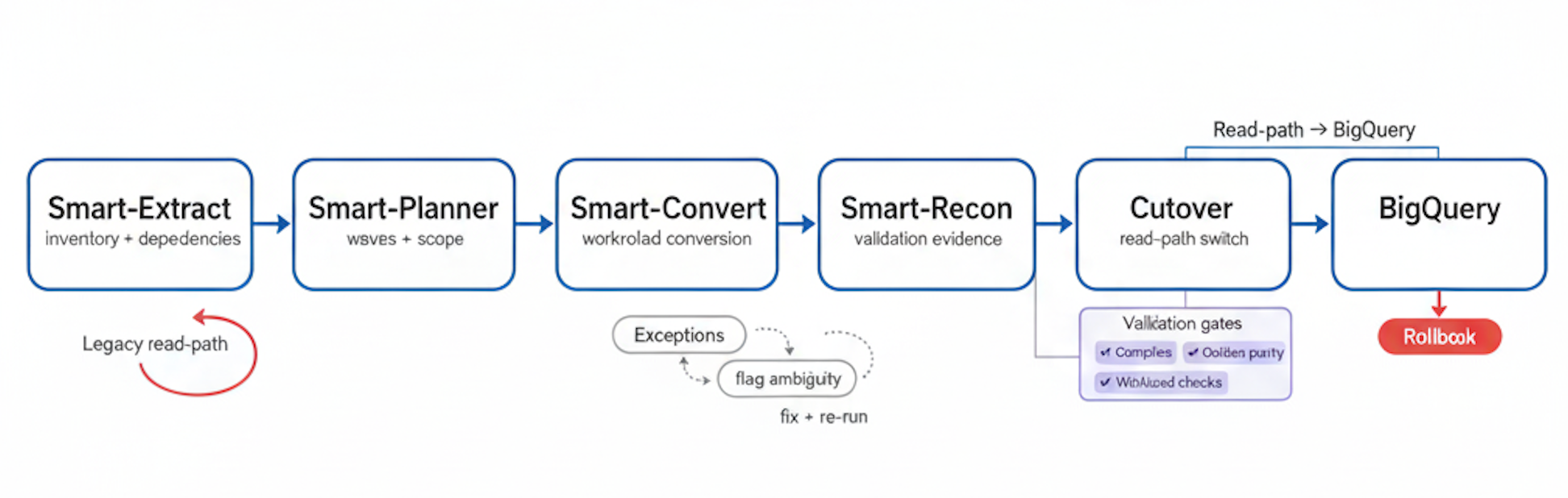
Extract → Plan → Convert → Reconcile → Cutover to BigQuery, with exception handling, validation gates, and a rollback path
Conversion
Redshift → BigQuery migration is not just “SQL translation.” The objective is to preserve business meaning while aligning to BigQuery’s execution model and cost structure. SmartMigrate converts what is deterministic, flags ambiguity, and structures the remaining work so engineering teams can resolve exceptions quickly. What we automate vs. what we flag:
Failure modes
Redshift-tuned physical design is treated as a schema detail, and performance collapses post-migration.
External table patterns are migrated inconsistently, breaking governance and creating cost regressions
Differences in numeric and timestamp casting silently change aggregates and join matches.
BI bursts that were contained by WLM cause concurrency/latency surprises in BigQuery.
Stored procedures and scheduled logic are pushed “later,” and pipelines fail immediately after cutover.
MERGE/upsert and incremental refresh semantics diverge, creating slow, compounding mismatches.
Executive dashboards fail parity due to rounding/NULL/timezone edge cases nobody captured.
“Same query” becomes expensive due to bytes-scanned patterns and missing pruning/materialization.
Controls
In a Redshift → BigQuery migration, success must be measurable. We validate correctness in layers: first ensuring translated workloads compile and execute reliably, then proving outputs match expected business meaning via reconciliation. Validation is driven by pre-agreed thresholds and a defined set of golden queries and datasets. This makes sign-off objective: when reconciliation passes, cutover is controlled; when it fails, you get a precise delta report that identifies where semantics, type mapping, or query logic needs adjustment. Checks included (typical set): - Row counts by table and key partitions where applicable
Optimization
Do the work
Do you have signed-off golden queries/reports + thresholds (including type and timezone edge cases) before conversion starts?
Do you know which datasets remain external (BigLake/external tables) vs fully managed in BigQuery—and why?
Do you have a plan to migrate stored procedures, schedules, and orchestration with operational parity?
Have you defined how partitioning/clustering/materialization will replace Redshift physical tuning for hot workloads?
Parallel run + canary gates + rollback criteria + BigQuery guardrails (bytes scanned, slots, latency) are ready.
Workloads
FAQ
Both support analytics SQL, but practical differences show up in type casting, function behavior, and execution/performance models. Redshift is tuned with DIST/SORT keys and WLM; BigQuery relies on partitioning/clustering, bytes-scanned economics, and slot-based concurrency. A reliable migration requires explicit handling of these differences rather than assuming syntax-level compatibility.
We make type mapping decisions explicit and normalize casting in translated queries. Precision/scale and timezone-sensitive cases are validated using representative datasets and reconciliation checks to avoid subtle result drift.
We translate the intent into an explicit BigQuery strategy: managed tables where governance and predictable performance are needed, and external/BigLake patterns where appropriate. The approach is validated by workload tests (bytes scanned, latency) and operational constraints.
We use layered validation: compiler/execution checks, then reconciliation checks (row counts, profiling, aggregates by key dimensions, sampling diffs) and golden query parity. Thresholds are defined up front so correctness is measurable and auditable.
Yes—with a defined strategy. We classify procedural logic and schedules, translate what is straightforward, and re-home orchestration to appropriate patterns (e.g., Dataform/dbt + Composer/Workflows). The goal is operational parity, not just query parity.
Cost is driven by bytes scanned, concurrency, and repeated query patterns. During assessment, we analyze query shapes and scan patterns, then recommend partitioning/clustering/materialization and slot strategy. Post-migration, we set up monitoring to track bytes scanned and regressions.
Often yes—via a parallel run window with controlled cutover gates and a rollback-ready plan. The approach depends on batch vs CDC movement, SLA requirements, and downstream consumer behavior. Cutover is gated by reconciliation thresholds and operational readiness.
Migration Acceleration
Get a migration plan you can execute—with validation built in. We’ll inventory your Redshift estate (including Spectrum, procedures, and WLM-driven concurrency), convert representative workloads, surface risks in SQL translation and type mapping, and define a validation and reconciliation approach tied to your SLAs. You’ll also receive a cutover plan with rollback criteria and performance optimization guidance for BigQuery.